I kept writing skills. New skill for code review. New skill for deployment. New skill for browser automation. Each one added a capability, and each one stayed a capability — a one-off that I had to consciously reach for. I had a growing vocabulary but no grammar. My automations weren’t composing into anything.
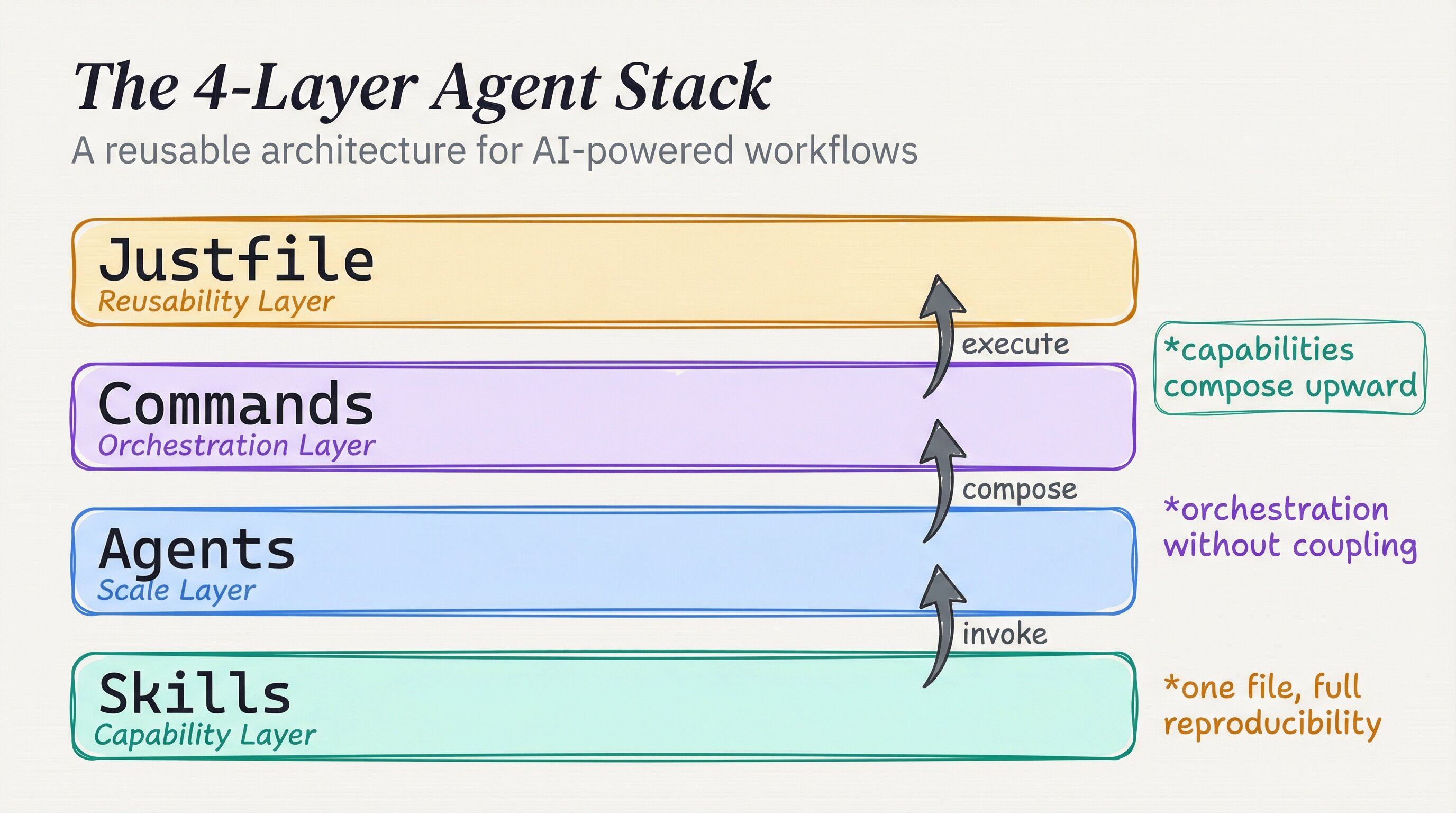
The shift came when I watched Indie DevDan’s breakdown of Bowser, his browser automation framework. He described four layers: skills at the bottom, agents in the middle, commands for orchestration, and a justfile at the top for reuse. Each layer had a job. Together they made repeatable work possible.
That framing clicked. I’d been building half a stack.
A skill is not a workflow
A skill teaches Claude what it can do. It documents a capability, sets constraints, and gives the agent something to reach for. It does not say when to use it, in what sequence, or how to coordinate with other agents.
The four-layer model makes that explicit:
| Layer | Role | Example |
|---|---|---|
| Skills | Raw capability | playwright-bowser — headless browser control |
| Agents | Scale the skill | bowser-qa-agent — UI validation specialist |
| Commands | Orchestrate agents | ui-review — fans out parallel QA runs |
| Justfile | Reusability entry point | just ui-review — one command to run it all |
Each layer builds on the previous one. Any layer can be tested independently, and the layers compose for production. Each layer can also be invoked directly. A broken command can be traced down to the agent, then to the skill, which is enormously valuable for debugging. Skills alone create a vocabulary; the other layers create a language. If an automation still feels manual, the missing pieces are probably the agent and command layers. That is where the pieces compose.
Layer 1: skills
Skills describe what Claude can do in a domain: the tools, defaults, and constraints. This layer stays generic so it can be reused across projects. A skill tied to specific file paths or service names is brittle; it breaks when the context changes.
My playwright-bowser skill, for example, configures Claude to use the Playwright CLI for headless browser sessions. The skill sets defaults I’ve chosen: sessions are named for persistence, screenshots are saved at every step, parallel runs are enabled. The raw Playwright CLI has many options; the skill collapses them into an opinionated, repeatable interface.
The skill does not run anything. It gives Claude the capability and the rules for running it.
Layer 2: agents
Agents give the skill a job. A sub-agent is a prompt-engineered specialist that activates a skill and follows a concrete workflow — not just “can browse the web” but “validates user stories against a URL, takes screenshots at each step, and reports pass/fail back to the orchestrator.”
An agent can specialize in a specific workflow and be spawned in parallel. Three browser agents running three user stories simultaneously, each returning structured results to the primary agent. That’s 3x throughput with no extra engineering cost.
# agents/bowser-qa-agent.md — excerpt
description: |
  UI validation agent that executes user stories against web apps
  and reports pass/fail results with screenshots at every step.
  Supports parallel instances.
The agent is not a skill with a different name. It has a purpose, variables, steps, and an output format. The workflow specifics belong here: concrete steps, output format expectations, and error handling for a particular class of work. It knows what to do with the skill. A generic “browser agent” is useful. A “UI validation agent that parses user stories, takes timestamped screenshots, and reports structured pass/fail” is a system. The specificity is the value.
Layer 3: commands
Commands are the orchestration layer — the API for running agent teams. Dan calls this the “higher-order prompt”: a prompt that accepts another prompt, wraps it in consistent workflow logic, and runs it at scale.
My ui-review command discovers all user story files in a project, spawns one bowser-qa-agent per story, waits for all of them to complete, and aggregates the results. The individual agents do the work; the command coordinates them. Parallelization belongs in commands. Fan-out logic stays here rather than inside an agent: each agent does one thing well, while the command coordinates many.
how parallel agent fan-out actually works
The key mechanism is structured sub-agent invocation with a typed result contract. Each bowser-qa-agent receives a single user-story YAML and returns a JSON envelope — { story, status, screenshots, notes } — so the parent command can Promise.all them without coupling to any agent’s internal steps.
Under the hood, Playwright runs in headless Chromium via its CLI (playwright test --reporter=json). The agent skill configures a named browser context (persisted across steps for cookies/auth) and writes screenshots to a timestamped directory. The ui-review command globs for **/*.story.yaml, spawns one agent per file, then merges results:
# Minimal fan-out pattern (adapt to your runner)
stories=$(find . -name "*.story.yaml")
pids=()
for story in $stories; do
  claude --agent bowser-qa-agent --input "$story" --output "results/$(basename $story .yaml).json" &
  pids+=($!)
done
wait "${pids[@]}"   # all agents finish in parallel
jq -s '.' results/*.json > summary.json
The just task runner sits on top purely as an ergonomic alias — just ui-review forwards to this shell logic. Try it: add --reporter=html to the Playwright invocation and open playwright-report/index.html after a run to see per-step screenshots with pass/fail highlighted — the closest thing to a free visual regression baseline without a paid service.
DevFlow is another example. It detects the CI/CD stage — branch, commit, push, PR, review, or merge — and either advances to the next stage or blocks when the user has deviated. It uses no special agents, only orchestration logic over git state.
The command layer turns capabilities into workflows.
Layer 4: the entry point
The top layer makes the stack accessible. Dan uses a justfile — a task runner that aliases all your commands into one discoverable interface:
just ui-review        # run all UI tests
just automate-amazon  # run browser automation
just blog-summarize   # check latest from favorite blogs
I use a similar pattern in the open-source config. The just skill gives Claude access to a project’s justfile so it can run recipes and add new ones. The justfile is the index for what the stack can do: legible to humans and callable by agents. Running just with no arguments prints every available recipe, so the file is documentation as much as tooling and serves as the team’s onboarding map. The four layers aren’t overhead; they’re the difference between automation and infrastructure. Infrastructure is what I reach for repeatedly. A one-off script is not infrastructure; a four-layer stack deployed consistently is.
One real example
My BugBot skill is a clean example of all four layers:
- Skill — BugBot defines adversarial code review methodology: attack angles, confidence scoring, ODC trigger tracking
- Agent — The ralph-wiggum agent loop takes one iteration at a time, reads state from disk, picks untried angles
- Command —
/BugBotorchestrates the loop: detects changed files, sets up state file, launches the ralph-loop, waits forALL_CLEAN - Reusability —
just bugbot(if configured) kicks the whole thing off from the project root
The skill is the what. The agent is the how. The command is the when and in what sequence. The justfile is how I find it again six months later.
Tools used: Claude Code by Anthropic. Architecture from Indie DevDan’s 4-Layer Bowser System — highly recommended watch. Source: claude-agent-stack. Built with Claude Code by Anthropic.