I woke up at 2 AM with a familiar knot in my stomach. Another Analysis of Alternatives report was due, and I’d already burned five hours on it. Researching competitors, pulling feature grids, cross-referencing pricing tiers, hunting down citations — it’s the kind of grinding, necessary work that eats an entire day and leaves nothing for actual strategy.
At my consulting rate, each report effectively cost thousands of dollars in time.
At 2 AM I asked a narrower question: could AI handle the research and compilation while I kept the part that needed a human — judgment?
Turns out it can. I built an agent that writes AOA reports in minutes. The demo is gone now, but the wiring is still useful.
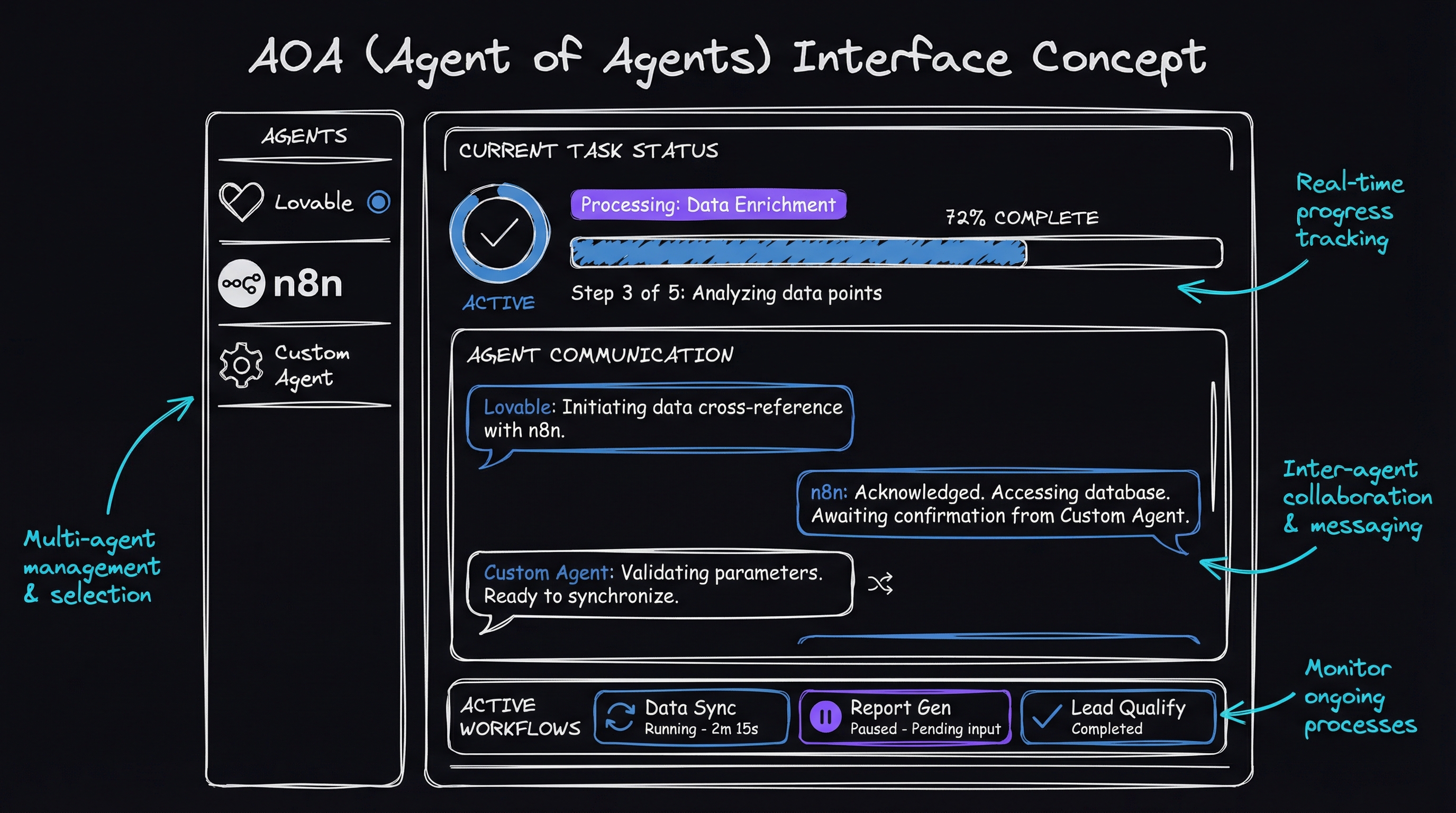
What the agent did
⚠️ Note: This project has been deprecated. The demo is no longer available, but the architecture concepts below still apply. Watch tutorial →
The agent researches any topic, writes a full report with citations, evaluates its own output, and iterates until the quality meets a bar I set. It has two modes:
- Pro Mode: 2–4 minute reports with 5 citations. Good for quick comparisons when a client needs a directional answer today.
- Deep Research Mode: 10+ minute reports with 15–30 citations. For when the analysis has to hold up under scrutiny.
I built the system in hours with visual tools, not in months. No React and no backend framework. Just two services talking to each other.
Two tools
Lovable is an AI assistant that turns chat prompts into working interfaces. You describe what you want; it generates a React frontend. You don’t need to know React — it helped that I did, but Lovable handles the heavy lifting. There’s a free tier.
N8N is visual workflow automation. Think of it as Zapier’s more capable cousin, except you self-host it (I run mine on a VPS — a virtual private server, basically a cheap cloud computer). It connects to any API — an application programming interface, the way two services talk to each other — without writing code. Drag boxes, draw lines between them, done.
The tools communicate through a webhook — an automated HTTP callback that fires when the frontend submits a search. Lovable creates the interface. N8N runs the AI pipeline.
graph LR
    User[User] --> UI[Lovable UI]
    UI -->|Webhook| N8N[N8N Workflow]
    N8N --> Perplexity[Perplexity AI]
    N8N --> Claude[Claude Writer]
    Claude --> Evaluator[Quality Check]
    Evaluator -->|Retry if needed| Claude
    Evaluator -->|Success| UI
The interface — 30 seconds to a working interface
I opened Lovable and typed a single prompt:
Create a search interface with two modes:
- Pro mode (2-4 minutes)
- Deep Research mode (10+ minutes)
Include a text input for the search query and a search button.
Lovable produced a React interface immediately. The useful step was connecting it to the service that did the work.
Here’s the code Lovable generated to wire the frontend to the N8N backend:
// Lovable generated this for me
const handleSearch = async () => {
  const response = await fetch('https://your-n8n-webhook-url/aoa', {
    method: 'POST',
    headers: { 'Content-Type': 'application/json' },
    body: JSON.stringify({
      task: searchQuery,
      mode: searchMode
    })
  });

  const data = await response.json();
  setReport(data.report);
};
One more prompt — “Make this look professional with a modern gradient background and smooth animations when the report loads” — gave me an interface that looked like it took a week to build.
The workflow
N8N is where the work happens. I dragged nodes onto a canvas and connected them. One receives the webhook, one branches on a condition, another calls an AI API, another evaluates the output, and the loop goes back when it needs to.
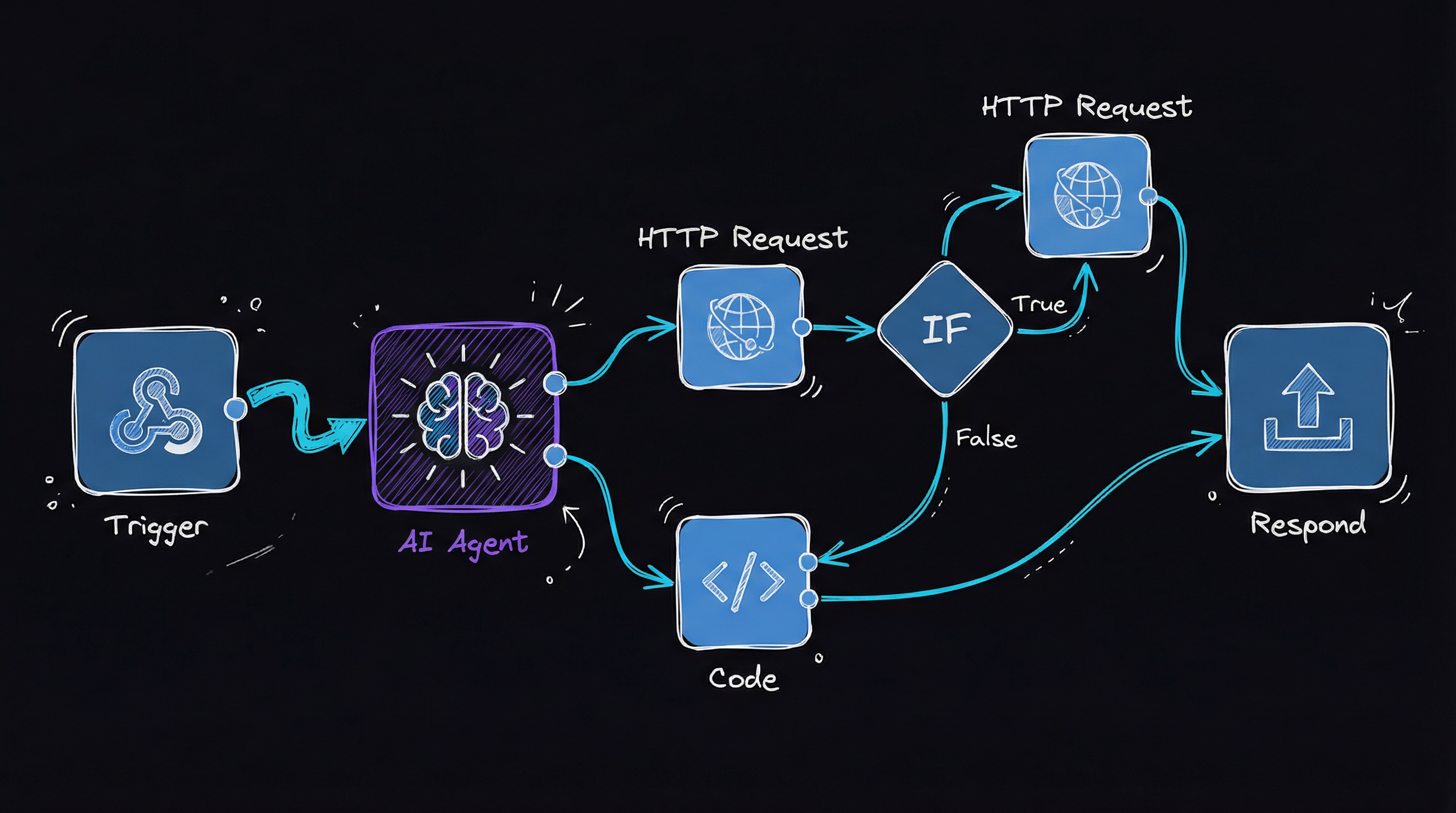
Each request takes this path:
- Webhook Trigger — receives the search query from the Lovable frontend
- Mode Branch — routes to different instructions depending on Pro or Deep mode
- Perplexity Research — fires off a web search with Perplexity AI (a real-time research engine that returns cited results), and gets back sourced content
- Report Writing — Claude (Anthropic’s large language model) takes the research and crafts the analysis
- Quality Evaluation — a second Claude call checks whether the report meets the standards I defined
- Retry Logic — if it fails the quality check, the feedback gets injected back into the writer’s instructions and it tries again
The research phase
The Perplexity integration is straightforward. In the N8N Perplexity node, I drop in:
// N8N expression in the Perplexity node
{
  "model": "sonar",
  "messages": [{
    "role": "user",
    "content": `Write a thorough report on: ${json.body.task}`
  }]
}
The prompt has a shape
For Deep Research mode, I wrapped detailed instructions in XML tags, a technique Anthropic recommends in its prompt-engineering docs. The tags make the instructions distinct from ambient context:
<instructions>
Write an Analysis of Alternatives report with:
- Length: 4000-5000 words
- Citations: 15-30 sources
- Sections: Executive Summary, Evaluation Criteria,
  Detailed Analysis, Recommendations
</instructions>

<example>
[One-shot example of a high-quality report]
</example>
how the evaluator loop actually works
The quality-control loop is the part most tutorials skip. Here is the mechanism in full.
Why structured XML beats plain prose for instructions. Claude and other frontier models have been trained to treat XML-tagged blocks as high-salience delimiters. Wrapping your rubric in <instructions> and your few-shot example in <example> causes the model to attend to them as distinct, typed inputs rather than ambient context — the same reason system-prompt separation exists in the Chat Completions API. The result is more reliable section compliance and lower variance across runs.
The evaluator is a second LLM call, not a regex. After the writer node produces a draft, N8N routes it to a separate Claude call whose only job is to return structured JSON: { "passes": true/false, "rationale": "..." }. Separating generation from evaluation into two model calls is the key insight — the same model that wrote the report is a poor judge of its own output (it rationalizes its choices). A clean evaluator prompt with explicit, countable criteria (section headers present, citation count ≥ N, word count in range) is far more reliable than asking the writer to self-score.
Retry-with-feedback is just prompt injection. When passes: false, N8N appends the evaluator’s rationale to the next writer call as a <feedback> block. The writer sees its previous failure mode and corrects for it. Capping retries at 5 in the N8N loop node prevents runaway API spend.
Try this: replicate the evaluator pattern in any LLM playground. Generate a short analysis, then send it to a second call with:
You are a strict editor. Reply ONLY with JSON: {"passes": true|false, "issues": ["..."]}
Criteria: has an Executive Summary section, cites at least 5 sources, exceeds 500 words.

<draft>
{{paste output here}}
</draft>
You will catch structural gaps the first model consistently misses.
The quality loop
The agent did not dump text and stop. It critiqued its output and improved it.
The first draft is rarely good enough. I learned this the hard way — my early prompts produced reports that looked complete but missed entire sections or cited four sources when I’d asked for fifteen. The fix was separating the writer from the judge.
After the writer node produces a draft, N8N sends it to a second Claude call. That call checks the boxes and returns a verdict:
// Simplified evaluation logic
const evaluationCriteria = {
  hasExecutiveSummary: true,
  citationCount: mode === 'deep' ? 15 : 5,
  wordCount: mode === 'deep' ? 4000 : 1000,
  sectionsComplete: true
};

if (!meetsAllCriteria) {
  // Retry with specific feedback
  return retryWithFeedback(evaluation.rationale);
}
When a report fails, the agent records the reason — “missing the Recommendations section, only 3 citations found” — and gives that reason to the writer: “Your previous attempt failed because the Recommendations section was missing. Here is your draft so far. Add the missing section and ensure at least 15 citations.”
It caps retries at 5 to prevent an infinite loop burning API credits. Most reports pass on the first or second retry.
The money-saving trick
During development I ran the workflow maybe a hundred times. Each run called Perplexity and Claude, and those API calls add up fast. Here’s what saved me hundreds of dollars:
// Pin successful outputs during testing
if (testMode) {
  saveOutput(perplexityResult);
  return pinnedOutput; // Skip API call
}
I pinned the Perplexity research output after the first successful run for a given topic. While iterating on the writer prompt and evaluator criteria, I reused the same research data instead of paying for fresh searches every time.
If you want to run it in 5 minutes
Requirements
- Lovable account (free tier works)
- N8N instance (cloud or self-hosted)
- Perplexity API key ($5 gets you started)
- OpenRouter account (an API gateway that gives you access to Claude and other models without managing separate billing for each)
The setup
-
Clone the Lovable template:
- Start a new Lovable project
- Copy the UI code from my examples
- Update the webhook URL to point at your N8N instance
-
Import the N8N workflow:
- To request the N8N workflow template, email [email protected]
- Import into your N8N instance
- Add your API keys
-
Configure the connection:
// In Lovable, update this line: const WEBHOOK_URL = 'https://your-n8n-domain.com/webhook/aoa'; -
Test with a simple query:
- Try: “Compare the best CRM tools for small businesses”
- You should see results in 2–4 minutes
-
Customize for your needs:
- Adjust the prompt templates
- Modify evaluation criteria
- Add your own examples
Adapt it to your domain
Legal/Compliance Reports: Add regulatory citation requirements, risk assessment sections, and specific formatting standards.
Technical Comparisons: Emphasize performance metrics, add code examples, include architecture diagrams.
Business Analysis: Focus on ROI calculations, market size data, and competitor pricing.
What is left to build
This agent is a starting point. A few directions I’m considering are multi-language support to translate reports automatically, PDF generation to export polished documents instead of raw text, team collaboration for shared editing and annotation, historical tracking to compare analyses across time periods, and custom templates for the industry-specific formats clients expect.
Community and resources
- Lovable Discord: UI help and sharing what you’ve built
- N8N Community: Workflows and troubleshooting
- My GitHub: Full source code
Going deeper
- Loom Video Tutorial: Watch me build this step by step
- Perplexity API Docs: Advanced search features
- Prompt Engineering Guide: Write better AI instructions
The pattern beyond AOA reports
The same pattern applies no matter what you’re building, including market research, technical docs, and competitive analysis: a simple Lovable UI, an N8N workflow, AI services through OpenRouter, and another iteration whenever the evaluator finds a problem.
Moving repetitive analysis into an agent lets it run while you do something else. Email [email protected] to request the N8N workflow template.
Questions and examples are welcome on LinkedIn or my website.