I’ve been working on a project to support Server-Sent Events (SSE) for MCP. MCP is the Model Context Protocol. I couldn’t find a clear Python client example for SSE with FastAPI MCP, so I wrote one and documented the session flow here.
The protocol in plain terms
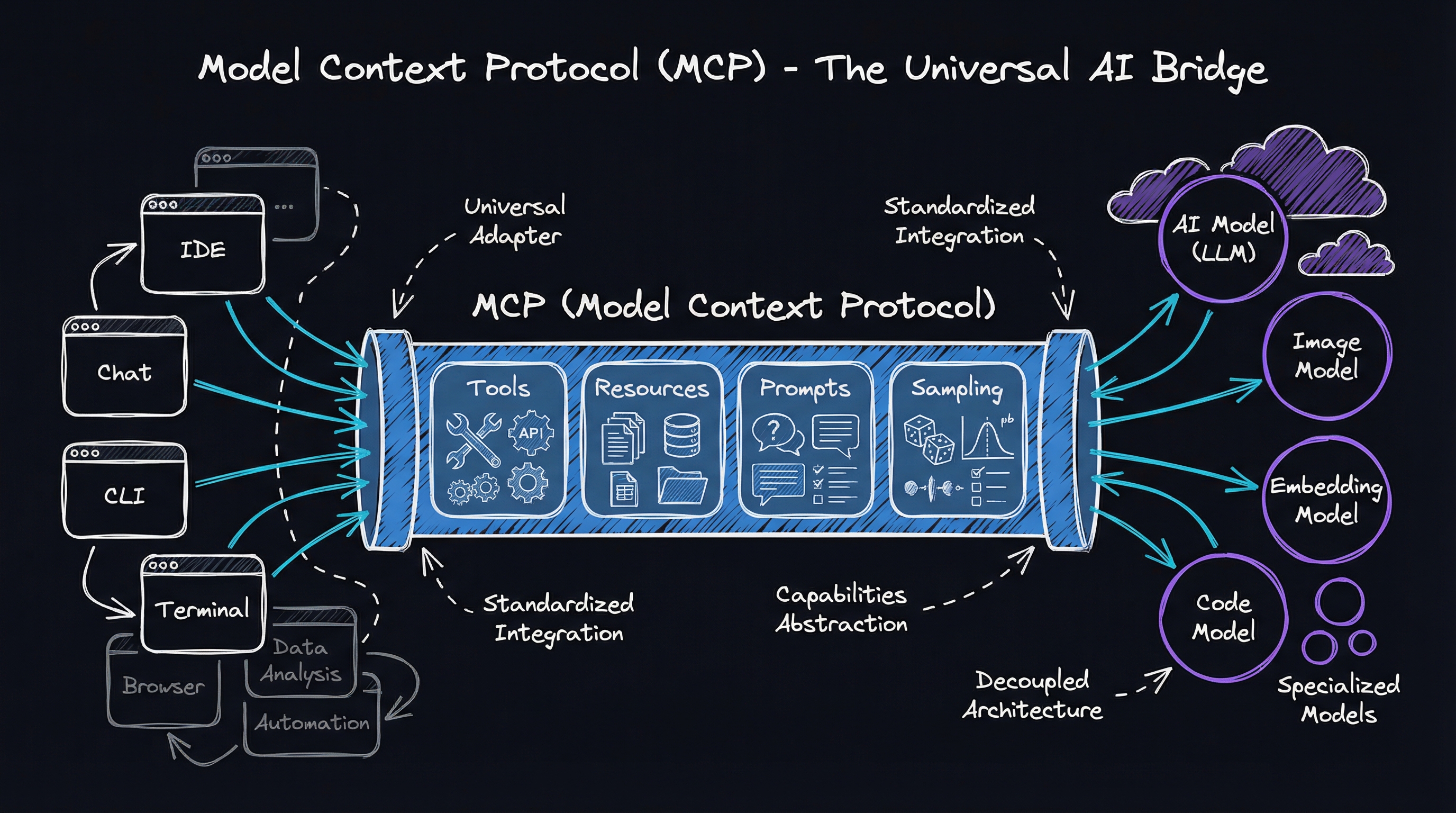
Model Context Protocol (MCP) is an emerging standard for communication between applications and AI models or services. The client and server use it to:
- Establish a session between client and server
- Call model-powered tools with parameters
- Process streaming results in a standardized format
- Maintain context across multiple interactions
It is useful when an application needs to talk to an AI service while the service is still generating a response. Streaming responses are becoming increasingly common as models generate content incrementally, and the result can arrive in pieces instead of waiting for one large response.
The connection flow
MCP over Server-Sent Events (SSE) creates a reliable pattern: the client opens a persistent SSE connection and receives a session ID. It then sends commands as ordinary HTTP POSTs, while the results come back over the open stream.
the mechanism — SSE session handshake and why it works
The key insight is that SSE is half-duplex by design: the browser (or httpx/aiohttp) opens one long-lived text/event-stream GET, and the server pushes newline-delimited data: frames down it. MCP exploits this by returning a session_id in the very first SSE frame, then accepting all commands as ordinary HTTP POSTs that carry that ID as a query param. The server fans the POST response back through the already-open SSE channel — so you get full-duplex semantics without WebSockets.
┌────────┐                                    ┌────────┐
│        │  1. GET /mcp  (SSE connection)     │        │
│        │ ──────────────────────────────────►│        │
│        │  2. data: session_id=<uuid>        │        │
│        │ ◄──────────────────────────────────│        │
│        │  3. POST /mcp/messages/?session_id │        │
│ Client │    body: {method:"initialize"}     │ Server │
│        │ ──────────────────────────────────►│        │
│        │  4. POST /mcp/messages/?session_id │        │
│        │    body: {method:"tools/call",...} │        │
│        │ ──────────────────────────────────►│        │
│        │  5. data: {result chunks...}       │        │
│        │ ◄──────────────────────────────────│        │
└────────┘                                    └────────┘
Under the hood, fastapi-mcp-client uses Python’s httpx with stream=True to hold the GET open, a asyncio.Queue to bridge incoming SSE frames to callers, and an asyncio.Event to signal when the session ID is ready before the first tool call fires. The server side is the mcp package’s FastApiMCPServer, which registers tools as FastAPI route handlers and writes framed JSON to the SSE response body.
Try it yourself — install the package and spin up the bundled echo server in one terminal, then connect from another:
# terminal 1 — run the example MCP server
pip install fastapi-mcp-client
python -m fastapi_mcp_client.examples.server

# terminal 2 — watch the SSE frames raw
curl -N http://localhost:8000/mcp
# you'll see:  data: {"type":"session","session_id":"..."}
# then call a tool in terminal 3 and watch results stream here
If curl -N shows a session ID and then streams data: lines when you POST a tool call, the handshake is working exactly as described.
That gives the server a persistent, efficient one-way stream to the client. It fits AI-generated content because the server can send each result as it becomes available.
Why I wrote the client
FastAPI supports SSE and the MCP server implementation exists. The Python client side still had some holes:
- No dedicated Python client libraries for MCP over SSE
- Challenges in maintaining session state across requests
- Lack of examples showing proper error handling for stream interruptions
- No standardized approach for processing the streamed events
That left developers writing complex, error-prone boilerplate for session state, stream-interruption handling, and event parsing.
fastapi-mcp-client
The fastapi-mcp-client library handles all the complexities of the MCP protocol behind an async-first API:
import asyncio
from fastapi_mcp_client import MCPClient

async def main():
    async with MCPClient("http://localhost:8000") as client:
        # Standard call - simple and clean
        result = await client.call_operation("echo", {"message": "Hello, MCP!"})
        print(f"Echo result: {result}")

        # Streaming call - same simple interface
        stream = await client.call_operation(
            "generate_numbers",
            {"count": 5},
            stream=True
        )

        async for event in stream:
            print(f"Event: {event}")

asyncio.run(main())
The library establishes and maintains the SSE connection, manages the session, formats protocol messages, handles errors, and processes streamed responses.
Where this is useful
The same connection is useful for AI chat, where tokens stream directly to the user; document search, where results appear as they are found; content generation, where a long job can show progress; and data pipelines, where processed chunks do not have to wait for the full job.
Run it
Install it with pip or uv:
# Install with pip
pip install fastapi-mcp-client

# Or with UV
uv add fastapi-mcp-client
The repository includes example servers and clients.
Check out the GitHub repository for more examples and documentation.